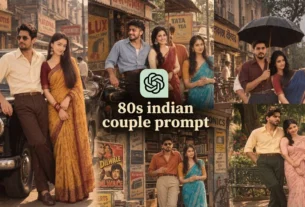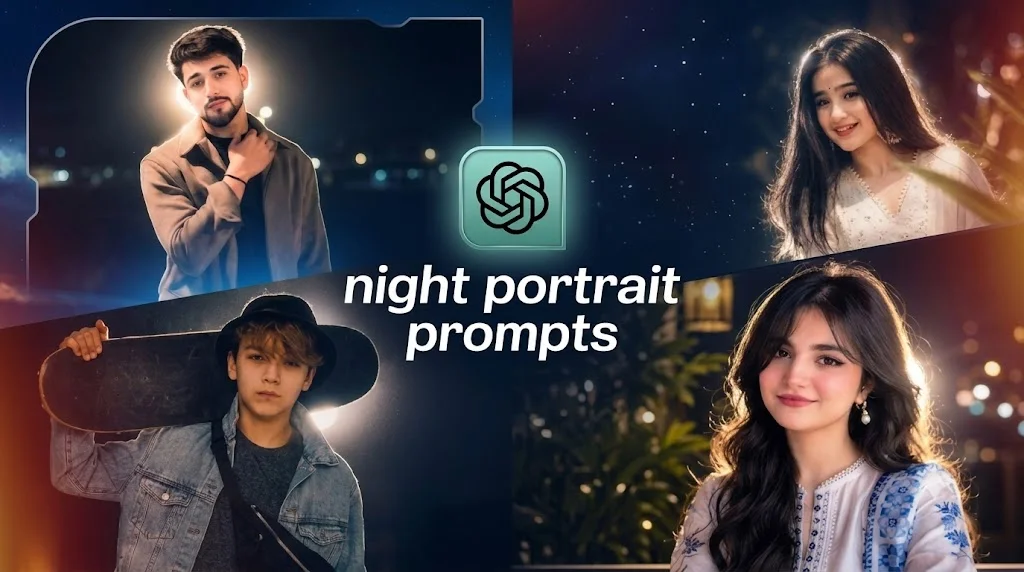
A new trend is taking over social media, where creators turn simple photos into stunning, professional works of art using night portrait prompts. If you’ve ever seen those amazing “night glow” aesthetic images on Instagram and wondered how they look so clear and sharp, you’re not alone. Usually, standard low-light photography ends up looking grainy and dark, but this new AI-driven conversion process changes everything. Because of this, I want to share this popular editing technique with you and show you how to do it. If you want to apply this captivating night glow effect to your own regular photos and achieve real DSLR-quality results, this article is for you. Today, we’ll go over how to transform any ordinary photo into a night glow masterpiece, the specific AI tools you’ll need, the step-by-step process to follow, and the exact prompts you should use to get started.
Details of Night Glow AI Photo Editing Prompts
The transformation process behind this trend is simple but very effective. You start with a standard photograph, perhaps one taken during the day or in a relaxed evening setting. Next, you use a set of specialized AI prompts. To give you complete creative freedom, we have provided various night portrait prompts for different artistic styles. You can choose the one that best fits your taste. Just copy your chosen prompt and paste it into your preferred AI image generator. Once you do that, the AI will change your ordinary photograph into a stunning nighttime image.
Mistakes to Avoid with Night Portrait Prompts
- Certain mistakes are crucial to avoid if you want to do this type of AI photo editing. To get the most out of these popular night portrait prompts, make sure you follow these key guidelines:
- Avoid Over-Edited Images. Your priority should be to stay away from images that are already heavily edited or filtered. Using such photos will lead to poor AI results, which might make you wrongly think that the prompt isn’t effective. Always choose a completely simple, raw, and unedited photograph for the best outcomes.
- Say No to Low-Quality Photos. You need to avoid using low-resolution or blurry images. Don’t use a photo where your facial features are unclear. If your original photo is low quality, first improve it using an app like Remini. Once it’s enhanced and sharpened, apply the night glow effect.
- Do Not Tamper with the Prompts. You must not add any extra elements or change the main structure of the prompt itself. These night portrait prompts are finely tuned. If you change the text, your resulting image will likely not look professional.
Update: The “Lo-Fi Dusk” Trend on Instagram: this exact “Night Glow” editing style is currently trending on Instagram under the name of a specific filter—the “Lo-Fi Dusk” filter. Millions of creators are using it to make a huge number of viral photos right now.
I thought, “Why not add some fresh, high-quality prompts and share them with you?” While I had shared a few basic ones before, today I have gathered 10 brand-new, high-quality night portrait prompts that you can use to create your own stunning photos.

Transform the uploaded photo into an ultra-photorealistic Midnight Halo portrait. Preserve the exact face, hairstyle, skin tone, expression, outfit, pose, body proportions, and identity without any changes. Place the subject in a deep black nighttime environment with soft cinematic blur and subtle distant lights. Add a powerful white halo light directly behind the subject, producing realistic rim lighting around the hair, shoulders, arms, clothing edges, and body outline. Illuminate the face with a soft front flash while maintaining natural shadows. Use warm skin highlights, realistic pores, gentle bloom, soft halation, fine film grain, faded blacks, low-light camera noise, shallow depth of field, premium cinematic color grading, and realistic DSLR quality. The result should look like a viral Instagram night portrait. Negative Prompt: different face, altered identity, face reshaping, plastic skin, cartoon, anime, unrealistic glow, neon outline, blurry eyes, distorted hands, extra fingers, missing fingers, watermark, logo, text, duplicate person, oversaturated colors.
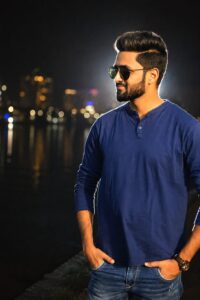
Create a realistic luxury night flash portrait from the uploaded image. Keep the exact same face, hairstyle, expression, body shape, clothing, pose, skin tone, and identity unchanged. Place the subject against a dark luxury evening background with soft blurred city lights. Add a bright white backlight behind the body to create clean rim lighting. Use natural front flash illumination, warm skin tones, realistic facial texture, cinematic contrast, soft haze, bloom, halation, faded blacks, shallow depth of field, premium DSLR flash photography look, realistic lens imperfections, and subtle film grain. Negative Prompt: face modification, identity change, over-retouching, fake skin, anime, CGI, unrealistic lighting, extra limbs, blurry details, watermark, text, logo.

Transform the uploaded photo into a realistic rainy street portrait at night. Preserve the exact face, hairstyle, expression, pose, outfit, body proportions, and identity. Create a softly blurred rainy city street with wet reflections, muted colors, and cinematic darkness. Add white back rim lighting from behind with soft front flash. Include realistic rain mist, subtle reflections, bloom, film grain, CCD sensor noise, faded blacks, warm peach skin highlights, shallow depth of field, and natural low-light atmosphere. Negative Prompt: face alteration, different person, unrealistic rain, fake glow, cartoon, oversaturated colors, watermark, text, logo.

Edit the uploaded image into a realistic Blue Hour cinematic portrait. Keep the subject's exact identity, face, hairstyle, expression, outfit, pose, and body proportions unchanged. Place the subject in a dark twilight environment with soft navy shadows. Add a clean white backlight that naturally wraps around the body edges. Use soft frontal flash, realistic skin texture, gentle bloom, halation, muted colors, faded blacks, fine grain, DSLR realism, and shallow depth of field. Negative Prompt: changed face, reshaped features, plastic skin, unrealistic glow, anime style, duplicate person, text, watermark.
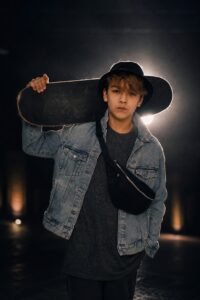
Transform the uploaded photo into a realistic cinematic night portrait with absolutely no neon colors. Preserve the same face, expression, hairstyle, clothing, pose, body shape, and identity exactly. Create a dark minimal background with soft blur. Add bright white backlight producing realistic rim lighting. Use subtle front flash, natural skin texture, warm highlights, cinematic bloom, faded blacks, realistic low-light noise, soft lens flare, premium DSLR photography quality. Negative Prompt: neon lighting, fantasy aura, face modification, fake beauty filter, cartoon, watermark, logo, blurry face.

Create a realistic Instagram viral flash portrait using the uploaded image. Preserve the exact identity, face, hairstyle, expression, clothing, body proportions, and pose. Add strong white flash behind the subject with realistic glowing rim light. Use direct soft flash on the face, realistic skin pores, slight halation, warm highlights, muted colors, faded blacks, film grain, shallow depth of field, and nostalgic Y2K digital camera aesthetics. Negative Prompt: face change, reshaped features, unrealistic glow, overexposed face, anime, cartoon, bad anatomy, watermark.
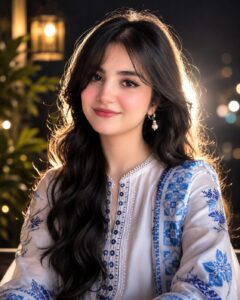
Transform the uploaded photo into a premium editorial magazine night portrait. Keep the face, identity, hairstyle, skin tone, expression, clothing, and pose exactly the same. Create a dark luxurious background with subtle texture. Add bright white studio backlight creating soft rim lighting around the body. Use balanced front flash, realistic skin detail, natural shadows, bloom, soft haze, cinematic grading, DSLR realism, shallow depth of field, and premium fashion photography quality. Negative Prompt: identity change, fake skin, cartoon, over-editing, blurry details, watermark, logo.

Edit the uploaded image into a realistic soft shadow portrait at night. Preserve the exact face, expression, hairstyle, body proportions, clothing, and identity. Use muted black shadows with faint background detail. Add realistic white backlight creating elegant rim lighting around the subject. Illuminate the face with gentle flash while maintaining cinematic darkness. Apply realistic film grain, halation, warm skin tones, faded blacks, shallow depth of field, DSLR quality. Negative Prompt: face alteration, different identity, plastic skin, fake lighting, anime, blurry face, distorted hands, watermark.

Transform the uploaded photo into an ultra-realistic DSLR night portrait. Preserve the subject exactly without changing facial features, hairstyle, expression, clothing, pose, or identity. Create a softly blurred nighttime environment with deep shadows. Add powerful white backlight behind the subject with realistic edge glow. Use subtle front flash, warm skin highlights, cinematic bloom, realistic camera noise, faded blacks, lens softness, shallow depth of field, and premium RAW photography quality. Negative Prompt: changed face, unrealistic glow, CGI, anime, oversaturated colors, watermark, text, duplicate subject.
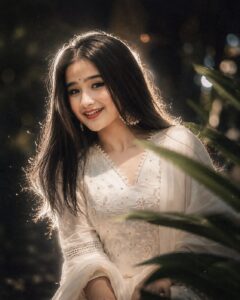
Transform the uploaded image into a viral aesthetic night portrait. Preserve the exact face, hairstyle, expression, outfit, pose, body proportions, and identity. Place the subject in a dreamy dark environment with soft background blur. Add bright white backlight creating realistic rim glow around the entire body. Use soft frontal flash, realistic skin texture, subtle bloom, halation, faded blacks, muted cinematic colors, fine grain, CCD camera noise, shallow depth of field, authentic Instagram aesthetic. Negative Prompt: different face, identity change, reshaped facial features, fake beauty filter, plastic skin, unrealistic glow, cartoon, anime, oversaturated colors, blurry face, bad anatomy, watermark, logo, text, duplicate subject.
How To Generate Images With ChatGPT
Generating stunning “Night Glow” photos with ChatGPT is easy because of its built-in DALL-E 3 image generation engine. If you have a ChatGPT Plus or Team subscription, you can turn text prompts into high-quality visuals.
Here is the step-by-step process to follow:
- Step 1: Open ChatGPT. Log into your ChatGPT account and make sure you are using the latest model that supports DALL-E image generation.
- Step 2: Upload Your Base Photo. Click on the attachment or plus (+) icon in the chat bar and upload the original, unedited photo that you want to transform.
- Step 3: Copy and Paste the Prompt. Choose your favorite style from the list below (e.g., Midnight Halo Portrait or Lo-Fi Dusk). Copy the entire prompt text, including the details about rim lighting and front flash, and paste it into the chat box.
- Step 4: Include the Negative Prompt. To ensure ChatGPT doesn’t change your facial features or alter your identity, type “Strictly follow these negative instructions:” right after the main prompt, and paste the corresponding Negative Prompt text.
- Step 5: Hit Generate. Press enter and let ChatGPT do its work. Within seconds, the AI will analyze your original image and create a striking, viral-ready night portrait!
Pro Tip: If the first generation isn’t perfect, you can reply to ChatGPT with variations like “Make the back halo light a bit stronger” or “Reduce the background blur slightly” to fine-tune your final image.
Frequently Asked Questions (FAQ)
Here are some common questions creators have when using these night portrait prompts to get the trending “Lo-Fi Dusk” effect:
1. Can I use these prompts on free AI image generators?
Ans: Yes! While these prompts work best with premium tools like ChatGPT (DALL-E 3) and Midjourney, you can also use them on high-quality free AI platforms like Bing Image Creator (Copilot) or Leonardo.ai.
2. Why is the AI changing my face or identity?
Ans: AI image generators sometimes try to change the face to fit the cinematic lighting. To fix this, make sure to include the provided Negative Prompt in your description and always upload a clear, high-resolution front-facing photograph.
3. Which Instagram filter matches this AI effect?
Ans: This look is inspired by the viral “Lo-Fi Dusk” trend on Instagram. These prompts replicate that professional, low-light flash photography style but with cleaner details and better rim lighting.
4. Do I need to edit my photo before uploading it to the AI?
Ans: No. It is best to use a completely unedited, natural photo. However, if your photo is too blurry or low-resolution, use an app like Remini to sharpen it before applying the AI prompts.
5. Can these prompts convert daytime photos into nighttime shots?
Ans: Absolutely! The main instruction in these night portrait prompts tells the AI to rebuild the entire background into a deep, cinematic, dark environment, transforming daytime lighting into a perfect night flash portrait.
Note: If you have any issues generating your photos with these night portrait prompts, please reach out to us. You can contact us through our Contact Us page. If you want to learn more about our work, our mission, and who we are, be sure to visit our About Us page.