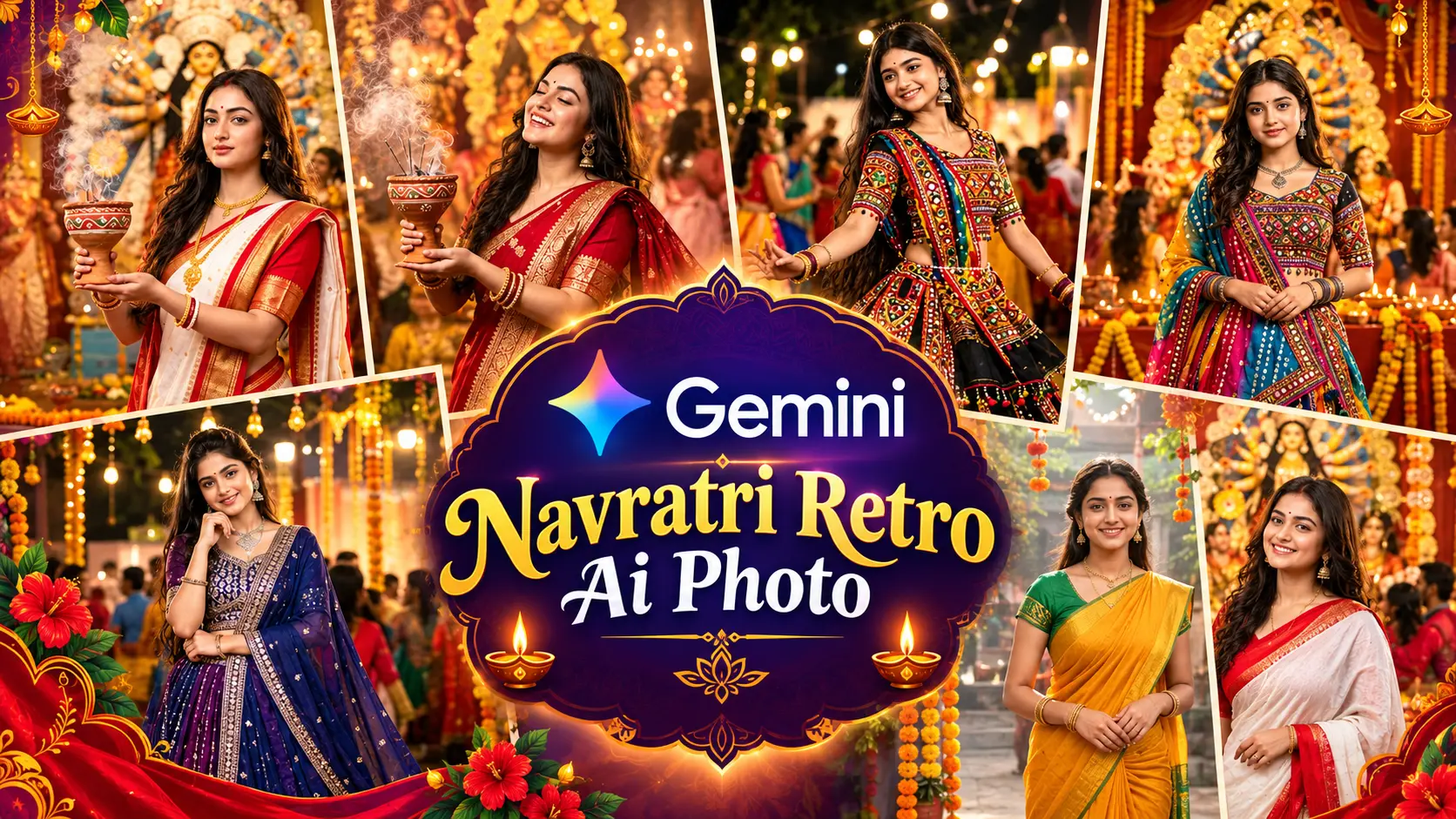
Navratri AI Photo Prompts help you transform your personal photos into beautiful festive portraits using Google Gemini. From colorful Garba nights to traditional sarees and graceful dhunuchi dance scenes, these prompts offer creative ideas for your Navratri photo editing.
Moreover, you can personalize each design by choosing your favorite outfit, background, and lighting. Simply upload your photo to Gemini, copy your preferred prompt, and generate your festive portrait. Finally, explore these 7 Navratri AI Photo Prompts to create stunning images for your social media posts while keeping your natural facial features recognizable.
Google Gemini Navratri Retro AI Photo Editing
Google Gemini makes it easy to explore retro-inspired Navratri photo edits with a creative traditional look. You can combine vintage color tones, classic Indian outfits, warm lighting, and festive backgrounds to create unique portraits. Moreover, by uploading your photo and using a detailed prompt, you can customize the overall style while keeping your natural facial features recognizable. Therefore, try different retro effects and Navratri themes to create eye-catching images for your social media.
Details of Google Gemini Navratri Retro AI Photo Editing
Google Gemini Navratri Retro AI Photo Editing is a creative way to transform your regular photos into vintage-inspired festive portraits. By using Google Gemini and a detailed AI photo editing prompt, you can create a unique Navratri look with classic Indian outfits, warm lighting, retro color tones, and traditional festival backgrounds.
Moreover, you can experiment with different styles, such as vintage Garba night portraits, traditional saree looks, colorful Navratri pandals, and cinematic festive photography. These styles can give your pictures a nostalgic appearance while maintaining the spirit of Navratri.
To get started, upload a clear photo to Google Gemini and enter your preferred retro Navratri prompt. Describe the outfit, background, lighting, colors, and photography style you want. For a more natural result, ask Gemini to preserve your original facial features, hairstyle, and skin texture.
Finally, try different Google Gemini Navratri Retro AI Photo Editing ideas to create personalized festival portraits for Instagram, Facebook, Pinterest, and other social media platforms.
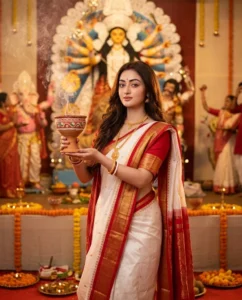
Create a photorealistic Navratri festival portrait using my uploaded photo as the exact identity reference. Preserve my exact facial identity, facial structure, hairstyle, skin tone and natural expression. I am wearing a beautiful traditional red and white saree with elegant gold borders and traditional jewelry. I am holding a decorated dhunuchi in both hands, performing a graceful Navratri devotional pose. Behind me is a magnificent traditional Durga idol inside a beautifully decorated pandal. Add soft incense smoke rising naturally from the dhunuchi, marigold flowers, warm diyas and subtle festive decorations. Include a few people celebrating naturally in the distant background. Warm golden evening lighting, realistic smoke, authentic Indian festival atmosphere, natural skin texture, cinematic DSLR photography, shallow depth of field, vertical 4:5. Use my uploaded photo only as the identity reference. Preserve my exact facial structure, eyes, nose, lips, jawline, hairstyle and natural skin texture. Keep the person clearly recognizable as the same individual. Do not change facial proportions, do not replace the face, do not artificially beautify the face, and avoid plastic-looking skin. Keep the Navratri environment realistic, culturally authentic and naturally photographed. Avoid fantasy backgrounds, excessive HDR, unrealistic decorations and artificial-looking people.
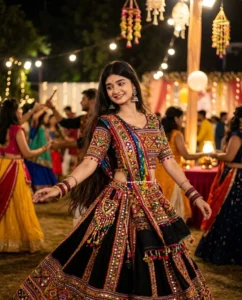
Create a realistic cinematic Navratri Garba night photograph using my uploaded photo as the exact identity reference. Keep my face and natural appearance completely unchanged. I am wearing a colorful traditional Gujarati chaniya choli with intricate mirror work, embroidery and a flowing dupatta. Add traditional bangles, earrings and subtle festive accessories. Capture me in a graceful Garba dance pose with the outfit naturally flowing around me. Background: a large outdoor Navratri celebration with people dancing in circular Garba formations, warm decorative lights, traditional patterns and festive atmosphere. Realistic evening photography, warm bokeh lights, natural movement, detailed fabric embroidery, authentic Indian Navratri celebration, cinematic DSLR quality, vertical 4:5. Use my uploaded photo only as the identity reference. Preserve my exact facial structure, eyes, nose, lips, jawline, hairstyle and natural skin texture. Keep the person clearly recognizable as the same individual. Do not change facial proportions, do not replace the face, do not artificially beautify the face, and avoid plastic-looking skin. Keep the Navratri environment realistic, culturally authentic and naturally photographed. Avoid fantasy backgrounds, excessive HDR, unrealistic decorations and artificial-looking people.
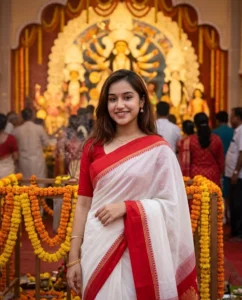
Create a beautiful authentic Indian Navratri portrait using my uploaded image as the exact identity reference. Preserve my exact face, hairstyle, facial features and natural skin texture. I am wearing an elegant white saree with a red traditional border, red blouse and minimal gold jewelry. I stand gracefully in front of a beautifully decorated Durga Puja/Navratri pandal with a calm natural expression. Behind me is a traditional Durga idol with warm golden lighting, marigold flowers, decorative arches and subtle incense smoke. Soft evening light, realistic background, natural crowd blur, authentic Indian festival photography, cinematic depth of field, realistic colors, vertical 4:5. Use my uploaded photo only as the identity reference. Preserve my exact facial structure, eyes, nose, lips, jawline, hairstyle and natural skin texture. Keep the person clearly recognizable as the same individual. Do not change facial proportions, do not replace the face, do not artificially beautify the face, and avoid plastic-looking skin. Keep the Navratri environment realistic, culturally authentic and naturally photographed. Avoid fantasy backgrounds, excessive HDR, unrealistic decorations and artificial-looking people.

Create an ultra-realistic cinematic Navratri festival photograph using my uploaded photo as the exact identity reference. Do not change my facial identity or facial proportions. I am wearing a rich crimson-red traditional saree with golden embroidery, traditional jewelry and a matching blouse. Capture me performing a graceful traditional dhunuchi dance while holding a decorated dhunuchi in one hand. The saree pallu should naturally flow with the movement. Behind me is a magnificent Durga idol, surrounded by realistic incense smoke, glowing diyas, flowers and warm festival lights. Add natural motion in the fabric and smoke, realistic crowd in the distance, authentic Indian Navratri atmosphere, cinematic golden lighting, DSLR photography, vertical 4:5. Use my uploaded photo only as the identity reference. Preserve my exact facial structure, eyes, nose, lips, jawline, hairstyle and natural skin texture. Keep the person clearly recognizable as the same individual. Do not change facial proportions, do not replace the face, do not artificially beautify the face, and avoid plastic-looking skin. Keep the Navratri environment realistic, culturally authentic and naturally photographed. Avoid fantasy backgrounds, excessive HDR, unrealistic decorations and artificial-looking people.
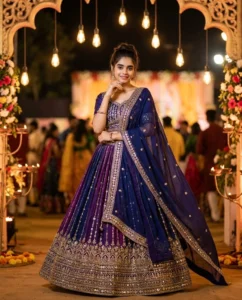
Create a premium cinematic Navratri night portrait using my uploaded photo as the exact identity reference. Preserve my exact face, hairstyle, skin tone and natural expression. I am wearing a luxurious deep-blue and purple traditional lehenga with detailed embroidery, mirror work and an elegant flowing dupatta. I stand confidently in a beautifully illuminated Navratri venue. Background filled with warm hanging lights, glowing diyas, decorative arches, subtle flower arrangements and a softly blurred festive crowd. Use realistic golden bokeh, natural shadows, detailed fabric textures and sophisticated cinematic lighting. Luxury Indian fashion photography combined with authentic Navratri festival atmosphere, photorealistic, vertical 4:5. Use my uploaded photo only as the identity reference. Preserve my exact facial structure, eyes, nose, lips, jawline, hairstyle and natural skin texture. Keep the person clearly recognizable as the same individual. Do not change facial proportions, do not replace the face, do not artificially beautify the face, and avoid plastic-looking skin. Keep the Navratri environment realistic, culturally authentic and naturally photographed. Avoid fantasy backgrounds, excessive HDR, unrealistic decorations and artificial-looking people.

Create a natural photorealistic Navratri festival portrait using my uploaded photo as the exact identity reference. Keep my face completely identical to the uploaded reference. I am wearing a bright mustard-yellow traditional saree with a green blouse, simple gold jewelry and traditional bangles. I stand naturally near a beautifully decorated temple courtyard during a peaceful morning Navratri celebration. Add marigold garlands, red flowers, traditional decorations, temple bells and a subtle Durga idol in the background. Soft early-morning sunlight, natural greenery, realistic architecture, gentle atmospheric haze, authentic Indian environment, realistic skin texture, natural colors, professional outdoor photography, vertical 4:5. Use my uploaded photo only as the identity reference. Preserve my exact facial structure, eyes, nose, lips, jawline, hairstyle and natural skin texture. Keep the person clearly recognizable as the same individual. Do not change facial proportions, do not replace the face, do not artificially beautify the face, and avoid plastic-looking skin. Keep the Navratri environment realistic, culturally authentic and naturally photographed. Avoid fantasy backgrounds, excessive HDR, unrealistic decorations and artificial-looking people.
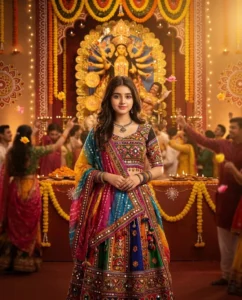
Create an ultra-premium cinematic Navratri personal portrait using my uploaded photo as the exact identity reference. Preserve my exact facial identity, facial structure, hairstyle, skin tone and natural expression. I am wearing a stunning traditional multicolored Gujarati chaniya choli with intricate mirror work, colorful embroidery, traditional jewelry and a flowing dupatta. Show me standing gracefully in the center of a grand Navratri celebration. Behind me create a beautifully decorated festive stage with a majestic Durga idol, marigold flowers, diyas, decorative lights and elegant traditional patterns. Add a softly blurred crowd celebrating in the background and subtle floating flower petals. The clothing should move naturally, the lighting should look like a real professional photograph, and the environment should feel authentic rather than artificial. Ultra-realistic DSLR photography, cinematic golden lighting, realistic skin texture, detailed embroidery, natural depth of field, premium Indian festival photography, vertical 4:5. Use my uploaded photo only as the identity reference. Preserve my exact facial structure, eyes, nose, lips, jawline, hairstyle and natural skin texture. Keep the person clearly recognizable as the same individual. Do not change facial proportions, do not replace the face, do not artificially beautify the face, and avoid plastic-looking skin. Keep the Navratri environment realistic, culturally authentic and naturally photographed. Avoid fantasy backgrounds, excessive HDR, unrealistic decorations and artificial-looking people.
Customization Tips for Google Gemini Navratri Retro AI Photo Editing
You can easily customize your Navratri photos using Google Gemini by adjusting a few creative details. Follow these tips to create unique and realistic festival portraits.
- Choose Your Outfit: First, select your favorite traditional outfit, such as a colorful lehenga, an elegant saree, or a classic kurta. Then, mention the colors and patterns you want in your prompt.
- Change the Background: You can choose a decorated Navratri pandal, a vibrant Garba night, a traditional temple, or a beautiful festive setting. Moreover, adding specific background details can make your photo more personalized.
- Experiment with Retro Effects: To achieve a vintage appearance, try warm color tones, soft film grain, gentle shadows, and classic cinematic lighting. However, keep the effects subtle to maintain a natural look.
- Adjust the Lighting: Next, describe the lighting you prefer, such as golden-hour sunlight, warm festival lights, or soft evening illumination. This helps create a more attractive and balanced portrait.
- Preserve Your Natural Appearance: For better results, ask Gemini to preserve your original facial features, hairstyle, skin tone, and natural skin texture. Avoid excessive smoothing or unwanted changes to your appearance.
- Try Different Camera Styles: Additionally, experiment with portrait photography, cinematic framing, or a vintage film photography style to discover which look suits your idea best.
- Use the Right Image Ratio: Finally, specify a 4:5 aspect ratio for Instagram-style portraits or a 9:16 ratio for Stories and Reels. This helps your image fit your preferred platform.
By following these customization tips, you can create personalized Navratri portraits with Google Gemini. Therefore, experiment with different outfits, backgrounds, and retro effects until you achieve a festive style you love.
How to Use Google Gemini for Navratri Retro AI Photo Editing
Follow these simple steps to create beautiful retro-inspired Navratri photos using Google Gemini. Moreover, you can customize each prompt according to your preferred outfit, background, and photography style.
Step 1: Open Google Gemini
First, visit the official Google Gemini website and sign in with your Google account if required. Then, open the image generation or editing feature available in your account.
Step 2: Upload Your Photo
Next, upload a clear photo that you want to edit. For the best results, choose an image where your face is clearly visible and the lighting is good.
Step 3: Choose a Navratri Retro AI Prompt
Now, select your favorite Navratri retro AI photo editing prompt from the examples above. You can choose a Garba night, traditional outfit, festive pandal, or vintage-inspired portrait style.
Step 4: Customize Your Prompt
After selecting a prompt, adjust the details to match your preferences. For example, describe your favorite outfit, background, lighting, and retro color effects. Also, ask Gemini to preserve your original facial features and natural skin texture.
Step 5: Generate Your Image
Once your prompt is ready, submit it to Gemini and wait for the image to generate. If the first result does not match your expectations, refine the prompt and try again.
Step 6: Review and Save Your Photo
Finally, review the generated image to check the facial details, outfit, background, and overall quality. If you are satisfied with the result, save the image using the available download option and share it on your favorite social media platforms.
Tips for Better Results
- Use a clear, high-quality reference photo.
- Describe the retro style and festival background in detail.
- Keep your instructions simple and specific.
- Ask Gemini to preserve your natural appearance.
- Experiment with different prompts to find your preferred result.
By following these steps, you can create personalized Navratri retro portraits with Google Gemini. Therefore, try different styles and creative ideas to make your festive photos unique and memorable.
Best AI Tool for Navratri AI Photo Prompts
Google Gemini is a useful AI tool for creating creative festival portraits with Navratri AI Photo Prompts. It allows you to upload a photo, describe your preferred style, and generate personalized images inspired by Navratri celebrations.
Why Choose Google Gemini?
- AI Photo Editing: Transform your uploaded photos with traditional outfits, festive backgrounds, and retro-inspired effects.
- Custom Prompts: Describe the colors, lighting, poses, and decorations you want in your image.
- Creative Festival Styles: Explore Garba nights, traditional Indian fashion, decorated pandals, and cinematic portraits.
- Personalized Results: Ask Gemini to preserve your original facial features and natural appearance while editing the surrounding scene.
How to Get Started
First, visit Google Gemini and upload a clear photo. Next, copy one of your favorite Navratri AI Photo Prompts from this article and customize the details according to your preferences. Finally, generate your image and adjust the prompt if you want a different result.
Overall, Google Gemini is a convenient option for experimenting with Navratri AI Photo Prompts and creating personalized festive images for social media. Keep in mind that results may vary depending on your prompt and the features available in your account.
Need Help? Contact Us Anytime!
If you have any questions about using these Navratri AI Photo Prompts or creating your personalized retro-style Navratri portraits, please feel free to contact us. You can reach out anytime through our dedicated Contact Us page.
Google Gemini AI Photo Editing
Additionally, if you want to learn more about our website, our work, and our mission, visit our About Us page. We are always happy to help you explore creative AI photo editing ideas and discover new ways to make your festive portraits unique!