
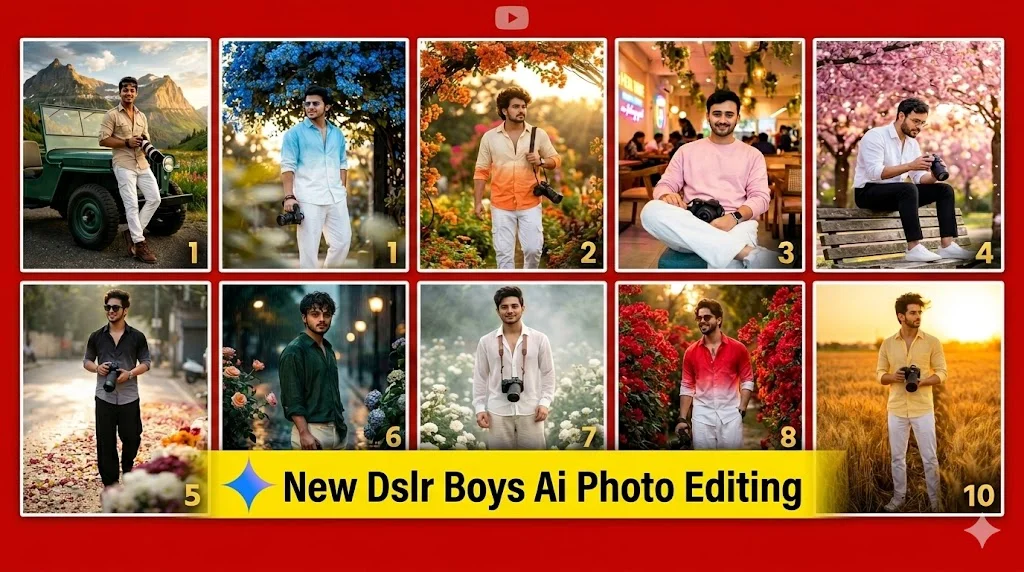
Google Gemini New DSLR Boys AI Photo Editing Prompts. Recently, we shared a step-by-step guide on editing cinematic DSLR photos using AI. You all really loved it! It made me happy to see so many of you successfully creating stunning, professional-grade images by following our editing methods. Due to your great response, I decided to bring you something even better to improve your editing skills. In this article, I will provide a brand-new collection of DSLR photo editing prompts that cover various aesthetic indoor café setups and vibrant outdoor flower garden backdrops. These text formulas are designed to perfectly preserve your face while adding a luxury, high-end fashion magazine look. You are going to love these ideas when you see the results! Be sure to try them out yourself, and let us know in the comments what you think about this new collection.
Details of Google Gemini New DSLR Boys AI Photo Editing Prompts
- The best part about this new DSLR AI editing technique is that it doesn’t require any complicated technical skills or hard work. It works in an incredibly simple way, which is why creators are truly loving it. Let’s break down what makes this trend so special:
- The DSLR Dream Redefined: Traditionally, professional DSLR cameras have been the ultimate dream for every boy who loves photography or wants high-quality portraits of themselves. However, with modern smartphones featuring high-quality lenses, that old excitement has faded somewhat.
- Bringing Back the Magic via AI: Now, thanks to AI tools like Google Gemini and ChatGPT, we can recreate that high-end DSLR camera magic instantly without needing expensive camera gear.
- Effortless Viral Aesthetics: Creating these viral photos is surprisingly easy. By using our text formulas, the AI automatically focuses on realistic skin tones, stylish outfits, and beautiful background bokeh that make your photos look stunning.
Whether you want a moody outdoor sunset shot or a bright aesthetic indoor café portrait, this technique covers it all. Below, I will explain everything to you step by step so you can easily create these trending photos in various unique styles!
How to Make Portrait Photos Using Gemini
Now, how can you create the perfect portrait photo using Google Gemini? To get great results, your photo needs the right background blur, good studio lighting, and a natural skin tone. Google Gemini makes it easy to balance all of these elements.
If you want a high-end, professional look, follow this simple process:
- Flawless Skin Retouching: If you want to smooth out textures, just include phrases like “Skin Smooth” or “Natural Glow” in your prompt. Gemini will analyze the face and correct the texture while keeping it realistic.
- Smart Lighting Adjustment: If the lighting in your original photo looks dull or uneven, you can fix it easily. Just specify the light balance you want, like “cinematic lighting” or “soft studio glow,” and the AI will light the scene perfectly.
- Perfect Background Blur (Bokeh): Gemini shifts the focus entirely to the subject. It separates you from the background, creating a creamy, DSLR-like shallow depth of field that blurs out distracting elements.
- Automated Color Toning: Forget manual color grading. The AI adjusts the colors, saturation, and contrast perfectly to give your photo a premium look.
How to execute it:
Simply open Google Gemini, upload your photo using the attachment icon, and write your instructions. You can type your prompt in English, Hindi, or any language you prefer. For example, “Smooth my skin, fix the lighting, and blur the background like a DSLR shot.”
Once you provide these details and hit generate, your perfectly edited portrait photo will be ready in seconds!

Create using uploaded image, exact face match 100%, no face changes. A stylish young Indian man wearing a sky blue and white gradient oversized shirt, loose white trousers, white sneakers, transparent sunglasses. Holding a Canon DSLR camera in one hand while standing under vivid blue bougainvillea flowers. Soft smile, looking away from camera. Foreground leaves heavily blurred, dreamy bokeh, golden hour sunlight, cinematic photography, realistic skin texture, shallow depth of field, ultra realistic 8K, fashion magazine style.
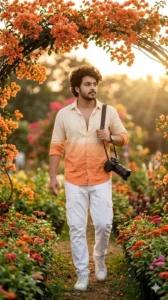
Create using uploaded image, preserve face exactly 100%. A handsome young man with fluffy curly hairstyle wearing a cream and orange gradient shirt, white cargo pants and sneakers. DSLR camera hanging from shoulder. Walking through a flower garden during sunset. Orange bougainvillea flowers overhead, cinematic warm lighting, soft sun rays, realistic shadows, shallow depth of field, luxury portrait photography, ultra detailed 16K.

Create a hyper-realistic portrait using uploaded face reference. Exact facial features preserved. Young South Indian man sitting inside a luxury café with neon lights and hanging plants. Wearing a pastel pink sweatshirt, loose white trousers, white sports shoes and smartwatch. DSLR camera placed on lap. Looking at camera with a gentle smile. Bright indoor lighting, creamy background blur, cozy aesthetic atmosphere, realistic photography, ultra HD.
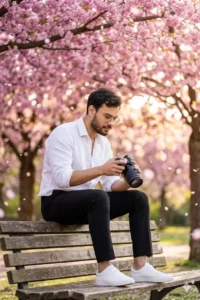
Use uploaded image as strict face reference. Same face 100% preserved. Stylish young man sitting on a wooden park bench under pink cherry blossoms. Wearing white linen shirt, black pants and white sneakers. Holding DSLR camera and looking down at photos. Soft golden sunlight, flower petals floating in air, dreamy cinematic mood, beautiful bokeh, realistic skin details, 8K RAW photography.
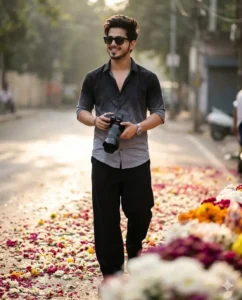
Create an ultra-realistic portrait using uploaded image. Face identity must remain exactly the same. Young man wearing black and grey gradient half-sleeve shirt, loose black trousers, black sunglasses, silver wristwatch. Holding DSLR camera with both hands while walking confidently on a street covered with flowers. Soft sunlight reflections, blurred floral foreground, luxury fashion photography, cinematic depth of field, ultra detailed.
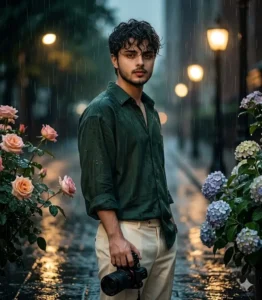
Create using uploaded face reference. Preserve facial identity 100%. Young man standing under light rain wearing dark green oversized shirt and cream trousers. DSLR camera in hand. Wet curly hair, romantic expression, water droplets on flowers around him. Cinematic rainy atmosphere, shallow depth of field, realistic reflections, dramatic lighting, ultra realistic portrait, 16K quality.
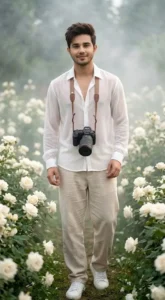
Use uploaded image as face reference. Same face exactly. Handsome young Indian man standing in a garden full of white roses. Wearing a transparent white chiffon shirt, loose beige pants and white sneakers. DSLR camera hanging from neck. Soft smile, dreamy atmosphere, misty background, realistic skin texture, creamy flower bokeh, cinematic photography, ultra detailed 8K.
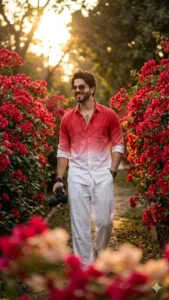
Create a cinematic fashion portrait using uploaded image. Exact face match 100%. Young man walking through a path lined with red bougainvillea flowers. Wearing a red and white gradient shirt, loose white pants, stylish sunglasses and wristwatch. DSLR camera in one hand. Confident smile, fashion model pose, dramatic sunlight, blurred floral foreground, luxury editorial photography, ultra realistic.
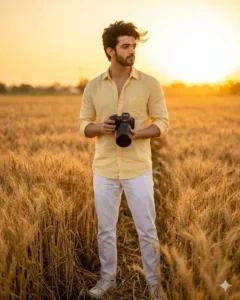
Create using uploaded face reference, preserve identity perfectly. Stylish young man standing in a golden wheat field during sunset. Wearing light yellow shirt, white trousers and sneakers. Holding a professional DSLR camera. Wind blowing through hair. Warm cinematic lighting, golden glow, shallow depth of field, dreamy atmosphere, ultra realistic skin details, premium portrait photography.
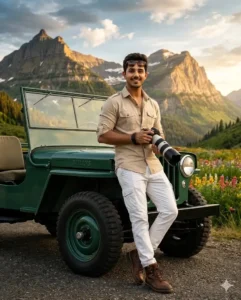
Use uploaded image as strict face reference. Exact face match 100%. A stylish travel photographer standing beside a vintage jeep. Wearing beige safari shirt, white cargo pants, sunglasses and boots. Holding a DSLR camera and smiling naturally. Mountains and colorful flowers in background. Cinematic travel poster look, dramatic lighting, realistic shadows, luxury editorial style, ultra detailed 16K, shallow depth of field.
How to Use Google Gemini New DSLR Boys AI Photo Editing Prompts
Want to know how to use these prompts to create your own professional photos? Will your face look perfect? Yes, absolutely! Just follow these quick steps:
- Step 1: Copy the Prompt: First, scroll up and copy your favorite DSLR editing prompt from our list.
- Step 2: Open Google Gemini: Click the Google Gemini button below to open the official AI tool instantly.
- Step 3: Paste and Upload Your Selfie: Paste the copied prompt into the chat box. Next, click the attachment icon to upload a clear selfie of yourself.
(Note: Gemini only uses your face from the selfie to keep your exact facial features. The stylish clothes and body are generated by the AI.) - Step 4: Click Generate: Finally, hit the “Generate” button. In seconds, Gemini will process your request and produce a stunning, high-quality cinematic portrait!
Recreating Trending Social Media Art with Google Gemini
You can easily create any viral photo from social media for yourself. If you like a trending photo, you will likely find its exact prompt on our website. You just need a basic idea of how to use it. Start by creating a matching title, search for it here, and you will quickly locate the prompt. If you can’t find it, there’s a simple alternative generate it yourself. First, figure out what to do. Upload the viral photo you want to recreate directly to Google Gemini and type “give me the prompt for this image.” The AI will provide a detailed text layout. You don’t need to copy and paste it into the generator as is. Instead, make some minor adjustments to the prompt. Add some of your preferred elements, remove any unwanted parts, and then paste the modified prompt back in. Finally, upload your selfie and hit generate to create your customized version of that viral photo instantly.

Gvj v
Thank you! Glad you liked the prompts.